
Building a file upload feature for a prototype is easy. You need a single endpoint, a basic storage bucket, and you’re done. But production is a different environment entirely. Files grow larger, users become global, traffic spikes unpredictably, and security requirements tighten. What once worked as a simple handler becomes a liability.
The core challenge here is about balancing tradeoffs. Security controls add latency, high throughput drives infrastructure costs, and budget constraints can compromise resilience. Engineering leaders and developers who understand these tensions build systems that scale cleanly.
This guide breaks down how to evaluate and balance the three variables that determine whether a production upload system succeeds.
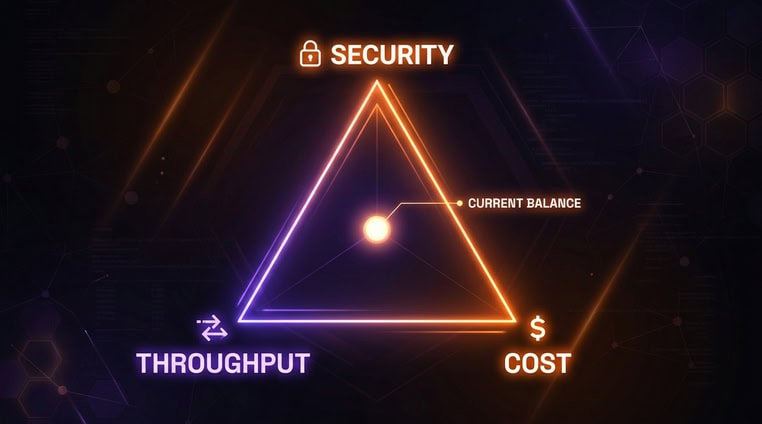
The Production Triangle: Security vs. Cost vs. Throughput
Every production upload system sits somewhere inside a triangle of competing priorities. Pushing hard on one corner almost always creates pressure on the other two. Understanding those tradeoffs upfront lets you make deliberate choices rather than stumble into them.
Consider a media platform handling video uploads. Maximum throughput requires parallel ingestion and autoscaling infrastructure, but that drives up compute and bandwidth costs. A legal firm uploading client documents prioritizes deep security scanning, but that adds processing time and latency. A startup running bulk internal imports wants the lowest infrastructure cost, but a single-region basic stack reduces resilience when that region has an outage.
The table above can serve as a map. With it, you can determine your team’s position, which depends on your users, your compliance requirements, and your growth stage.
Solving for Security: Protecting Every Upload
You can think of security in upload systems as a set of decisions that each reduce a different category of risk. Skipping any one of them leaves a gap that bad actors reliably find.
Direct-to-Storage Uploads with Signed Access
The most common upload architecture routes files through your application server. The server receives the file, validates it, and forwards it to storage. This works, but it exposes your server to every byte of every upload and creates a bottleneck at scale.
A more resilient pattern uses signed URLs. Your server generates a short-lived, permission-scoped token. The client uploads directly to cloud storage using that token, and your server never handles the file data. The storage provider enforces the permissions encoded in the token, including file size limits and expiry times.
Note: A signed URL is a time-limited link that grants specific, temporary access to perform one action on a storage resource. It expires automatically, making it useless outside the intended upload window.
File Validation Beyond Extensions
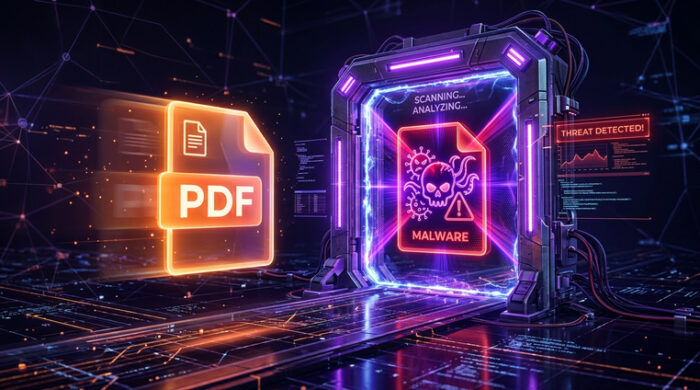
Extension checks are the weakest form of file validation. An attacker renames malware.exe to valid_report.pdf, and an extension-only check passes it through. Real validation requires multiple layers:
- MIME type validation: Checks the declared content type against an allowlist.
- Magic byte inspection: Reads the file’s binary signature to confirm its actual format.
- File size restrictions: Enforces limits before processing begins.
- Malware scanning: Runs the file through antivirus tools before it reaches storage.
- Content policy checks: Flags files that violate business rules, such as prohibited formats or embedded scripts.
Each layer catches what the previous one misses. Together, they form a meaningful defense.
Encryption and Access Controls
Encryption applies at two stages. In-transit encryption (via TLS/HTTPS) protects files as they move between the client and server. At-rest encryption protects files sitting in storage, typically using AES-256. Most cloud providers, like AWS, apply at-rest encryption automatically, but it’s worth verifying rather than assuming.
Access controls, which determine who can retrieve files after upload, also help secure your infrastructure. Additionally, role-based permissions restrict access by user type. Moreover, temporary access URLs expire after a set period, limiting the window of exposure if a link is shared unintentionally.
Note: TLS (Transport Layer Security) is the protocol that encrypts data in transit. It’s what puts the “S” in HTTPS and prevents third parties from intercepting file data during transfer.
Solving for Throughput: Handling Volume at Scale
Throughput problems rarely appear during development. They appear on launch day, during a marketing campaign, or when a large customer starts a bulk import. Building for volume before you need it is far cheaper than adjusting under load.
Resumable and Chunked Uploads
Standard HTTP uploads send a file as a single request. If that request fails, the entire transfer restarts. For large files, this creates a frustrating and resource-wasteful loop.
Chunked uploads split a file into fixed-size segments. Each segment travels as a separate request. If one fails, only that segment retries, not the whole file.
The server reassembles the complete file once all chunks arrive. This approach also enables resumable uploads. This means that if a connection drops entirely, the client queries which chunks the server already received and continues from there.
Parallel Processing and Queue-Based Workflows
Processing uploads synchronously, meaning within the same request that receives the file, creates a ceiling on how much your system can handle. Virus scanning, thumbnail generation, and transcoding all take time. Doing them inline blocks the response and limits concurrency.
Queue-based workflows decouple ingestion from processing. When an upload completes, the system publishes an event to a message queue. Worker processes consume that queue independently and handle each task in the background. The user’s request completes immediately, and processing scales separately from ingestion.
Note: A message queue is a buffer that holds task instructions until a worker is ready to process them. It allows the part of your system that receives uploads and the part that processes them to scale at different rates.
Global Ingress and Regional Performance
Physical distance between a user and your server adds latency to every upload. A user in Singapore uploading to a server in Ohio experiences that distance on every request, every chunk, every retry.
Distributed ingestion solves this by routing uploads to the nearest available entry point. Files enter the network close to the user and travel to their destination over the provider’s internal backbone. This can be significantly faster and more reliable than the open internet. For globally distributed user bases, this difference is measurable in both upload speed and completion rates.
Solving for Cost: Reducing Hidden Infrastructure Spend

Infrastructure costs for upload systems are easy to underestimate. Storage and compute are visible line items. Egress fees, engineering maintenance, and incident response costs are less obvious but often larger.
Storage Lifecycle Management
Not every file needs to live in high-performance storage indefinitely. Files accessed frequently in the first 30 days may sit untouched for months afterward. Storage lifecycle policies move files automatically to cheaper tiers as they age, without any manual intervention.
Most cloud providers offer tiered storage, such as standard, infrequent access, and archival. Configuring lifecycle rules to move files through those tiers based on access patterns can cut storage costs by 60% or more, depending on your data profile.
Bandwidth and Egress Costs
Egress fees apply when data leaves a cloud provider’s network. Downloads, cross-region transfers, and serving files directly from origin storage to end users generate egress. This is especially true at high volume.
CDN caching reduces egress by serving files from edge locations. Files that users request repeatedly get cached close to them, so fewer requests reach origin storage. For high-read workloads like media files or shared documents, CDN caching is one of the highest-leverage cost controls available.
Engineering Maintenance Costs
In-house upload infrastructure carries ongoing engineering costs that don’t appear in cloud bills:
- Monitoring: Building and maintaining dashboards and alerts.
- Incident response: Diagnosing and resolving upload failures in production.
- SDK upkeep: Keeping client libraries current across platforms.
- Security patches: Responding to new vulnerabilities in dependencies.
- Scaling work: Adjusting infrastructure as traffic patterns change.
These costs are real even when nothing breaks. Teams that underestimate them often find that maintaining an upload system consumes more engineering time than building new features.
Architecture Patterns for Production Upload APIs
The architecture you choose determines how much of the above you manage yourself. Each model distributes responsibility differently between your team and your infrastructure.
| Architecture | Best For | Limitation |
| App Server Proxy Uploads | Small apps | Server bottlenecks at scale |
| Direct-to-Cloud Uploads | Scale + lower server load | More setup required |
| Managed Upload Platform | Fast deployment | Vendor evaluation needed |
App server proxy uploads are the easiest to implement but the hardest to scale. Your server handles every file, which creates a ceiling on concurrent uploads. Direct-to-cloud uploads offload file handling to storage providers using signed URLs, which improves scalability but requires more configuration. Lastly, managed platforms handle the infrastructure layer entirely, trading setup effort for vendor dependency.
Ultimately, the right choice depends on your team size, compliance requirements, and how central file uploads are to your product.
When Managed Platforms Make Sense
Some teams build upload infrastructure from scratch and maintain it successfully. Others find that the ongoing cost outweighs the control it provides. Managed platforms with a file upload API tend to make sense in the following situations:
- Fast launch timelines: Building resumable uploads, malware scanning, and CDN delivery from scratch takes weeks. A managed platform compresses that to minutes or hours.
- Small engineering teams: Maintaining upload infrastructure competes directly with building product features.
- Global user base: Distributed ingestion and regional storage compliance require infrastructure that takes time to configure correctly.
- Strict compliance needs: GDPR, HIPAA, and similar frameworks require encryption, access controls, and audit logging that managed platforms often provide out of the box.
- Large file workloads: Chunking, resumability, and parallel processing are table stakes for large files. Managed platforms implement these by default.
- Built-in SDK needs: Client-side upload components for web and mobile require ongoing maintenance. Pre-built SDKs eliminate that work.
Managed platforms like Filestack address these scenarios. These solutions handle storage integrations, security controls, and SDK delivery without requiring teams to build each component themselves.
Conclusion
A production file upload API goes beyond being merely a transfer endpoint. It’s a balance of security controls, infrastructure costs, and reliable throughput. Teams that don’t plan for these tradeoffs early can build technical debt that compounds over time.
Whether you build in-house or adopt a managed solution, the decisions are the same. Choose where files go, how you validate them, how processing scales, and what the system costs to run. Making those decisions deliberately, before traffic forces them, is what separates production-ready from production-fragile.
Ready to reduce upload complexity without sacrificing security or performance? Explore Filestack’s file upload API and see how it can help your team manage secure uploads, transformations, and delivery at scale.
FAQs
What makes a file upload API production-ready?
A production-ready upload API handles failures gracefully, validates files beyond extension checks, scales without manual intervention, and provides visibility into failures. It separates ingestion from processing, enforces encryption at every stage, and keeps costs predictable as volume grows.
How do chunked uploads improve reliability?
Chunked uploads break a file into small segments sent as separate requests. If one segment fails, only that segment retries. This eliminates the all-or-nothing failure mode of standard uploads and enables resumable transfers after a dropped connection.
What is the most secure upload architecture?
Direct-to-storage uploads using signed URLs minimize server exposure by keeping file data off your application server. Pair that with magic byte validation, malware scanning, at-rest encryption, and role-based access controls for a defense-in-depth approach.
Why do file upload systems become expensive?
Storage costs are visible, but egress fees, CDN usage, and engineering maintenance often exceed them. Cross-region transfers, repeated downloads, and the ongoing cost of monitoring and patching an in-house system all contribute to a total cost that’s easy to underestimate.
Should uploads go through my server or directly to cloud storage?
Direct-to-cloud uploads using signed URLs are preferable at scale. Your server generates a short-lived token, the client uploads directly to storage, and your server never handles the file data. This helps reduce server load and removes a bottleneck for concurrent uploads.
Can managed platforms reduce engineering overhead?
Yes, significantly. Managed platforms handle resumability, validation, CDN delivery, and SDK maintenance by default. For small teams or teams under time pressure, that tradeoff, paying for a service instead of building and maintaining infrastructure, often accelerates delivery without sacrificing capability.