
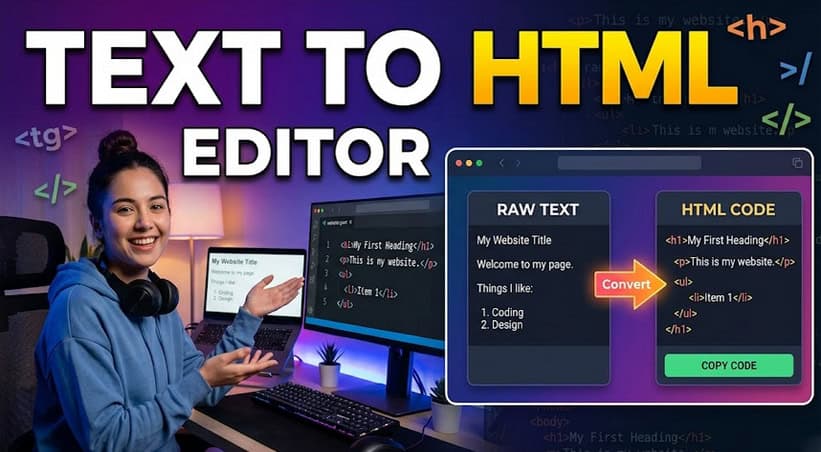
Most content doesn’t start as HTML. It starts as notes in a doc, a draft in an email thread, bullet points pasted from a slide, or raw text copied from a brief. And somewhere between that unstructured origin and a published web page, something has to bridge the gap.
For years, that bridge was manual HTML coding, a process that required technical knowledge, introduced formatting errors, and created a hard dependency between writers and developers. The result was slower publishing, inconsistent markup, and a lot of time spent fixing tags instead of improving content.
A text-to-HTML editor changes that equation. Instead of requiring writers to understand HTML structure or developers to clean up after non-technical contributors, it handles the conversion automatically, turning plain text input into clean, semantic markup through a visual interface that anyone can use confidently.
The benefits go beyond convenience. Cleaner markup means better rendering across browsers and devices. Faster formatting means shorter content cycles. And a consistent structure means less rework at the review stage. In this article, we’ll explore the pattern in detail, what it looks like, why it works, and where it delivers the most value.
Key Takeaways
- A text-to-HTML editor converts plain, unstructured content into clean, semantic HTML automatically, without any coding.
- Structured markup improves readability, supports responsive design, and creates more maintainable content.
- Real-time preview catches formatting issues before publishing, reducing revision cycles significantly.
- Common use cases span marketing, documentation, email, and internal content workflows.
- The right editor improves both productivity and content quality simultaneously, not one at the expense of the other.
Understanding the Text to HTML Editor Pattern
The pattern itself is simple, but the implications run deep. Understanding what a text-to-HTML editor actually does and why structured markup matters sets the foundation for every evaluation and adoption decision downstream.
What Is a Text to HTML Editor?
A text-to-HTML editor is a content creation tool that accepts plain, unformatted text as input and produces clean, structured HTML as output, with a visual editing interface in between. The writer never needs to see or touch the underlying markup. They work in a familiar word-processor-style environment; the editor handles the translation.
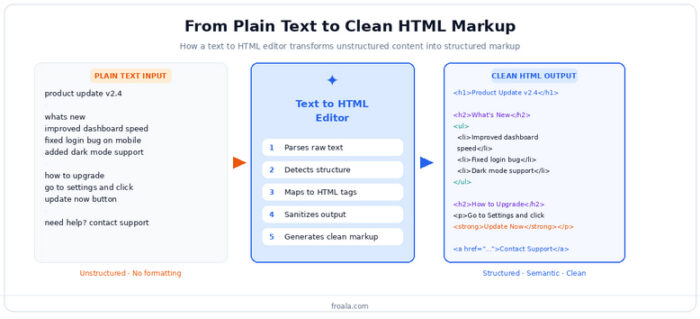
The workflow looks something like this: a writer types or pastes their content into the editor, applies formatting through a visual toolbar, selecting headings, creating bullet lists, adding links, and the editor maps those visual choices to the correct HTML elements automatically. A heading click becomes an <h2> tag, a bullet list becomes a <ul> with <li> elements, and a bold selection becomes <strong>.
Compare that to manual HTML coding, where the same content might require the writer to type raw tags, remember the correct nesting rules, and validate the output manually before publishing. The skill ceiling is higher, the error rate is higher, and the time cost is substantially greater.
The visual editing approach eliminates the skill requirement without sacrificing the structural quality of the output, which is what makes the pattern genuinely useful rather than just convenient.
Why Structured Markup Matters
Plain text has no inherent structure. A heading and a body paragraph look identical as raw text. A list and a sequence of lines are indistinguishable. When that content reaches a browser, there’s nothing to render, no hierarchy, no emphasis, no meaningful organization.
HTML provides that structure. And the quality of that HTML determines a lot about how the content performs:
- Readability and formatting improve immediately when content is wrapped in proper semantic tags. Browsers apply default styles to headings, lists, and paragraphs that improve scanability and visual hierarchy. Screen readers use that same structure to navigate content accessibly.
- Responsive web content depends on clean markup. CSS frameworks and responsive layouts assume well-structured HTML. Content wrapped in layers of unnecessary <div> tags or inline styles resists responsive behaviour and creates maintenance headaches.
- Publishing workflows become cleaner when the HTML coming out of the editor is predictable and consistent. Content management systems, static site generators, and email platforms all process HTML downstream, and they perform better when the input is structured and sanitised rather than messy and inconsistent.
Structure isn’t a technical nicety. It’s the difference between content that works and content that merely exists.
Here’s the conversion pattern in action: unstructured plain text enters on the left, the editor applies semantic structure in the middle, and clean, publishable HTML comes out on the right.
With the pattern established, the practical question becomes: what does the editor actually do to make content creation simpler?
How Text to HTML Editors Simplify Content Creation
The value proposition of a text-to-HTML editor isn’t just that it removes HTML knowledge as a requirement. It actively simplifies the content creation process in ways that improve speed, output quality, and team dynamics.
Faster Formatting Workflows
Speed is the most immediate gain. A piece of content that previously required a writer to produce in plain text, hand off to a developer for HTML formatting, review, and iterate, now completes in a single session with a single person.
Converting text into formatted HTML is a matter of toolbar clicks rather than tag typing. A writer selects a heading level from a dropdown, hits bold on a key phrase, and creates a list by clicking the list icon. The HTML emerges correctly structured without any additional step.
This reduction in manual coding effort is especially significant at scale. A content team publishing dozens of articles, help docs, or campaign pages per month doesn’t experience the time savings once; they experience them on every single piece of content, compounded across every contributor.
For non-technical users specifically, the simplification is more fundamental. It’s not just that formatting is faster; it’s that formatting is possible without relying on someone else. Content moves from draft to publish-ready without leaving the hands of the person who wrote it.
Cleaner and More Consistent Markup
Speed matters, but quality matters too. A text-to-HTML editor doesn’t just produce HTML faster; it produces better HTML than most manual approaches.
Human-written HTML carries the habits and inconsistencies of whoever wrote it. One developer uses <b> for bold; another uses <strong>. One writer wraps everything in <div> tags; another uses semantic sectioning elements. Copy-pasted content from Word or Google Docs brings along a cascade of inline styles that survive into the published page.
Editors that handle conversion automatically enforce consistency by design. Every heading produced by the editor follows the same tag pattern. Every list is structured identically. Every piece of pasted content gets sanitised before it enters the output: stripping inline styles, normalising whitespace, and removing the invisible markup clutter that makes HTML from copy-paste operations such a persistent problem.
The result is markup that’s not only cleaner at first publication but easier to maintain over time. When all content follows the same structural patterns, updates are predictable, styles apply consistently, and debugging layout issues becomes significantly less painful.
Real-Time Editing and Preview
One of the most practically valuable features of a text-to-HTML editor is real-time preview, the ability to see formatted output as it’s being created, before a single byte is published.
Without preview, formatting decisions are made blind. A writer marks something as a subheading without knowing how it will render. A table is constructed without seeing whether it breaks on mobile. A link is embedded without checking that it displays correctly in context. These issues surface at review or, worse, after publishing, creating rework cycles that cost time and introduce errors.
Real-time preview eliminates that lag. Formatting decisions are visible immediately. Layout issues: a heading that’s too large, a list that renders unexpectedly, a media embed that breaks the column, are caught during editing rather than during QA.
The confidence effect compounds over time. Writers who can see their content as they create it make fewer mistakes, need fewer revisions, and require less back-and-forth with reviewers. Publishing cycles shrink. The whole workflow moves faster.
Key Features of Modern Text to HTML Editors
Not all text-to-HTML editors are created equal. The ones that genuinely improve content workflows share a specific set of capabilities that distinguish them from basic converters or minimal rich text inputs.
Here are the five capabilities that define a capable text-to-HTML editor:
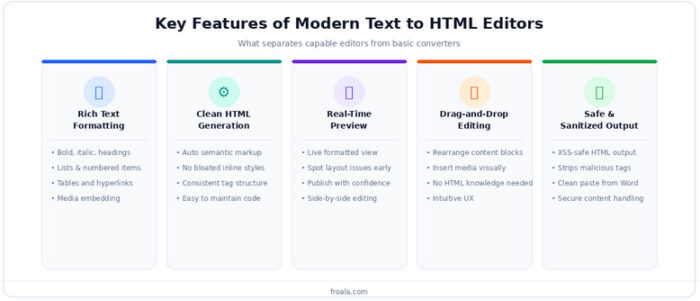
Rich Text Formatting Tools
Formatting capability is the baseline. A capable editor supports the full range of content structures that publishing workflows actually require:
- Text styling and alignment options: bold, italic, underline, strikethrough, text alignment, and color control give writers the expressive range they need without adding HTML complexity.
- Lists, tables, and hyperlinks are structurally important and worth testing carefully. Tables in particular have a history of inconsistent implementation: cell merging, row resizing, and paste-from-spreadsheet behaviour vary significantly between editors. If table support matters for your use case, test it explicitly.
- Media embedding: images, videos, and file attachments should feel native to the editing experience rather than bolted on. A writer who needs to insert a screenshot shouldn’t have to leave the editor, upload separately, and paste a URL manually.
HTML Code Generation
The quality of the HTML an editor generates is at least as important as the quality of its visual interface. An editor who produces clean markup on the front end but generates bloated, inconsistent HTML on the back end creates hidden technical debt that compounds every time content is published.
- Automatic clean HTML output means the editor produces semantic, standards-compliant markup without requiring manual cleanup. <h1> through <h6> for headings, <ul> and <ol> for lists, <a href> for links, all correctly structured and properly nested.
- Reduced unnecessary markup is especially relevant for editors who handle pasted content. The best editors strip inline styles, remove redundant wrapper elements, and normalise whitespace automatically. The worst ones preserve all of it, producing a tangle of <span> tags and inline CSS that breaks layouts and resists styling.
- Easier content maintenance follows directly from cleaner initial output. When the markup is predictable and consistent, updating content later, whether manually or programmatically, is straightforward. When it isn’t, every update risks introducing new inconsistencies.
User-Friendly Editing Experience
A text-to-HTML editor that’s powerful but confusing defeats its own purpose. The design of the editing experience determines whether non-technical users actually use it, or revert to workarounds.
- Intuitive toolbar functionality means the controls are discoverable without a tutorial. Users should be able to identify how to create a heading, insert a link, or add an image in their first session without consulting documentation.
- Drag-and-drop support removes friction from content rearrangement. Moving a section, reordering list items, or repositioning an image should be as simple as dragging it, not cutting, pasting, and adjusting surrounding tags.
- Minimal learning curve is the synthesis of these qualities. An editor that a new team member can use productively within an hour of onboarding reduces training overhead and accelerates adoption across teams.
The pattern applies broadly, but some contexts extract more value from it than others.
Common Use Cases for Text to HTML Editors
A text-to-HTML editor earns its place differently in different content environments. These are the three contexts where the value is most consistently and immediately felt.
Marketing and Blog Content
Marketing teams operate under relentless time pressure with high content volume and frequent format changes. A text-to-HTML editor fits that environment naturally.
- Creating formatted blog posts becomes a single-session task. The writer drafts, formats, embeds media, and produces publish-ready HTML without involving a developer or a separate formatting step.
- Managing landing page content benefits from consistent markup structure. When every landing page section follows the same HTML pattern, designers and developers can apply styles and updates reliably. Inconsistent markup from varied contributors creates the opposite problem.
- Publishing marketing campaigns at speed requires tools that don’t slow teams down. When a campaign needs a copy update, a visual editor with live preview lets the marketing manager make and verify the change in minutes, not days.
Documentation and Knowledge Bases
Documentation teams face a different challenge: a high volume of similar content types, frequent updates, and strict requirements for readability and navigability.
- Formatting help articles correctly matters more than it might appear. A well-structured help article, with proper headings, scannable lists, and clearly formatted code or steps, performs better in search, reads faster for users, and integrates cleanly with documentation platforms.
- Creating internal documentation benefits from the same structural consistency. Policy pages, process guides, and training materials that follow a consistent HTML template are easier to maintain, search, and update than ad hoc documents with idiosyncratic formatting.
- Organising support resources at scale, knowledge bases with hundreds or thousands of articles, depends on markup consistency. When every article is structured the same way, bulk updates, styling changes, and search integrations work predictably.
Email and Content Workflows
HTML email is one of the most technically demanding content formats; it must render correctly across dozens of email clients, each with its own quirks and limitations.
- Building HTML email content with a visual editor dramatically reduces the technical barrier. The editor handles the structural markup; the writer handles the message. Clean, inline-compatible HTML comes out without requiring the writer to understand email client rendering behaviour.
- Formatting newsletters consistently across issues and contributors is easier when everyone uses the same editor with the same templates and style constraints. Visual consistency improves with every issue rather than degrading as more contributors add their own formatting habits.
- Streamlining publishing processes: the approval, review, and publish cycle moves faster when the HTML being reviewed is clean and predictable. Reviewers catch content issues rather than spending time on formatting corrections.
The use cases point to specific, measurable benefits. Here’s what teams consistently report.
Benefits of Using a Text to HTML Editor
Adopting a text-to-HTML editor isn’t a minor workflow tweak; it shifts how content teams operate in ways that affect both speed and quality.
Improved Productivity
Faster content creation is the headline benefit. Removing the manual HTML layer from the content workflow compresses the time from draft to publish-ready. Tasks that required coordination between writer and developer are now completed in a single session with a single person.
Reduced editing complexity lowers the barrier for non-technical contributors. Writers focus on what they’re good at: communicating ideas clearly, without being required to develop skills adjacent to their core role. The editor handles the technical translation.
Better collaboration between teams emerges as a secondary benefit. When content arrives for review as properly structured, consistently formatted HTML, the review process focuses on content rather than formatting corrections. Back-and-forth iterations decrease, approval cycles shorten, and teams spend more time on substance.
Better Content Quality
Cleaner layouts and formatting follow automatically from clean HTML generation. Content rendered from properly structured markup looks better by default, is more consistent, more readable, and more reliably styled by the CSS applied downstream.
A more professional presentation is a direct output of semantic HTML. Browsers, email clients, and content management systems all render semantic markup more reliably than equivalent content built on messy, overridden styles. The published result looks intentional because the underlying structure is intentional.
Consistent brand styling is easier to maintain when all content follows the same markup patterns. When heading levels are predictable, list structures are uniform, and media embeds are handled consistently, applying global style updates affects all content reliably, not just the pieces that happen to be formatted correctly.
Why Text to HTML Editors Are Essential
Plain text is where most content starts. Clean, structured HTML is where it needs to end up. The distance between those two states, historically bridged by technical skill, manual effort, and error-prone coordination, is exactly what a well-designed text-to-HTML editor closes.
The pattern is simple, but the outcomes are substantial: faster publishing, fewer errors, more consistent markup, and less dependency on technical resources for routine content tasks. The teams that benefit aren’t just non-technical writers learning to format content without code; they’re development teams freed from content formatting support, review cycles shortened by cleaner inputs, and publishing workflows that move at the speed content actually needs.
As content operations grow, the case for structured workflows only strengthens. More contributors, more content types, more channels, all of them require consistent, maintainable HTML at their foundation.
A capable text-to-HTML editor provides that foundation without requiring the teams using it to think about HTML at all. That’s the pattern, and it’s the reason more content teams are adopting it, not as a workaround, but as the deliberate, efficient way to go from idea to published page.
For teams turning everyday drafts into publish-ready HTML, Froala Online HTML Editor offers a simple way to format content visually, preview changes, and generate clean markup without asking writers to work in code.
Frequently Asked Questions
What is a text-to-HTML editor?
A text-to-HTML editor is a visual content creation tool that converts plain, unformatted text into structured HTML markup through a WYSIWYG (What You See Is What You Get) interface. Users format their content visually: selecting headings, creating lists, and embedding media, and the editor automatically generates the correct HTML tags and structure behind the scenes. The writer never needs to write or understand HTML directly; the editor handles the full conversion from plain input to clean, publishable markup.
Why use a text-to-HTML editor instead of manual coding?
Manual HTML coding requires technical knowledge most content creators don’t have, introduces a higher risk of syntax errors and inconsistent markup, and creates a dependency between content teams and developers for routine formatting tasks. A text-to-HTML editor removes all three of those friction points: it requires no coding knowledge, generates consistent and validated HTML automatically, and puts publishing control in the hands of the person creating the content. The result is faster workflows, fewer errors, and less coordination overhead.
Can text-to-HTML editors generate clean markup?
Yes, and the quality of that output is one of the most important dimensions to evaluate when choosing an editor. The best text-to-HTML editors generate semantic, standards-compliant HTML without unnecessary inline styles, redundant wrapper tags, or the formatting clutter that typically comes from copy-pasting content from word processors. They also sanitise pasted content automatically, stripping problematic markup before it enters the output. The result is HTML that’s cleaner at first publication and significantly easier to maintain and update over time.